


Costco Wholesale
4.733.77K Reviews
App Specs
- Version
- 26.8.1.1
- Updated On
- License
- Free
- Downloads
- 10,000,000+
- Developer
- Costco Wholesale
- Categories
- Shopping
- Platform
- Android, iOS
Screenshots
 Analysis by AppCompare
I find Costco Wholesale most useful when I treat it as a companion to a warehouse visit, rather than a replacement for one. It gives me a way to check the account and browse shopping options before I leave home, then keep membership details close at hand while I’m there. The app is free, and the developer is Costco Wholesale. That makes it easy to try, though the practical value depends on how often you shop with Costco and which parts of the experience you actually use.
A free app, with value tied to how you shop
Costco Wholesale is a shopping app with a 4.6 average from around 366,000 ratings, and it has passed 10 million installs. It is rated for everyone, first appeared on June 21, 2012, and the current version is 25.12.1.1 for devices running iOS 12 or later. Those figures suggest a well-established app, but they don’t tell me whether it will suit your routine; the more useful question is whether its Costco-specific tools save you effort.
There’s no app charge to weigh against the benefits. The relevant cost question is instead whether the membership and shopping habits you already have make the app worthwhile. If you visit a warehouse regularly, keeping your membership information on your phone and checking offers can be a practical convenience. If you rarely shop at Costco, installing another retailer’s app may not change much for you.
Where the convenience pays off
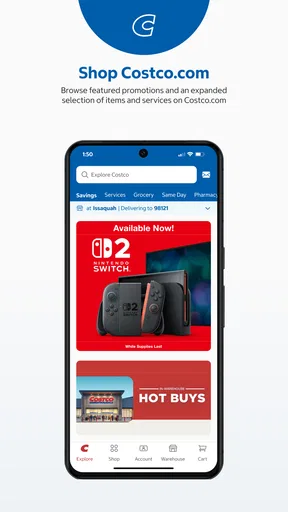
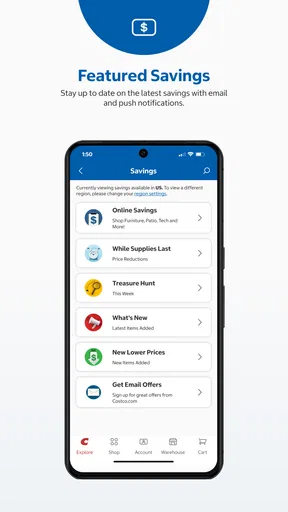
A useful habit is to browse before a planned trip, not just while standing in an aisle. I can look up likely purchases, check current offers, and use saved searches to return to things I have already considered. That makes the app more helpful as a planning tool than as an impulse-buying feed. For bulk items in particular, deciding in advance what is worth carrying home can make a warehouse visit feel less hectic.
It also helps to separate browsing from buying. A deal can look appealing in isolation, but the real value depends on whether I need the item, can use the quantity, and have room to store it. I’d use the offers as prompts to compare against my household list rather than treating every promotion as a saving. This small step keeps a shopping app from turning a low-cost download into unnecessary spending.
What to expect beside other shopping apps
Compared with a general marketplace or a supermarket app, this one is most compelling when the task is specifically tied to Costco: checking membership information, viewing member offers, or preparing for a warehouse trip. A broad retailer may be more convenient for comparing many brands or buying a single everyday item, while a local grocery app may fit a short-notice meal shop better. I wouldn’t choose Costco’s app as my only shopping tool unless Costco is already a regular part of my routine.
The same distinction matters for delivery. The app supports order tracking, which is useful when I have placed an order and want to follow it, but I would still choose the shopping method based on the item and my plans. For something I want to inspect in person, a warehouse visit makes more sense; for a planned order, tracking adds reassurance after checkout. The app is strongest when it supports that choice rather than pretending every purchase belongs in one channel.
Worth Reading Before You Choose

EA SPORTS FC Mobile 26 Is a Bigger Football Game, but It Takes Time

Flipboard Shows What News Apps Must Do Beyond the Feed

Switching to Android Auto Means Rethinking Your Driving Routine

Google Calendar Makes a Crowded Week Easier to Manage

Ludo King Makes the Most of the Minutes Between Plans

Baby Panda World Brings Quick Play to Modern Phones, but Its Game Library Feels Busy
A practical routine for members
For a realistic example, imagine I’m planning a weekend restock. Before leaving, I search for a few household staples, review any relevant offers, and check that my membership details are ready on my phone. At the warehouse, I can show the digital card instead of searching through my wallet. Later, if I order something for delivery, I can use the order-tracking option to keep an eye on it. Each step is modest, but together they remove small points of friction from a trip I was already making.
One useful trade-off is notifications. They can help bring an offer to my attention, but they can also pull me toward purchases I hadn’t planned. I’d keep them only if I find the reminders genuinely useful, and I’d still check expiry timing and relevance before acting. Likewise, saved searches are handy for repeat shopping, but they are not a substitute for checking the current item and offer details before paying.
Shopping Made Simple
First off, the app's layout is super intuitive. You know how sometimes apps can feel like a maze? Not this one. The Costco Wholesale app makes it easy to navigate, letting you find what you need without any hassle. Whether you're hunting for those massive packs of paper towels or that delicious rotisserie chicken, everything is just a couple of taps away.
The search function is a lifesaver too. Just type in what you're looking for, and boom, it's there. Plus, the app saves your past searches, which is a nice little touch. It's like the app knows what you want even before you do!
Membership Perks
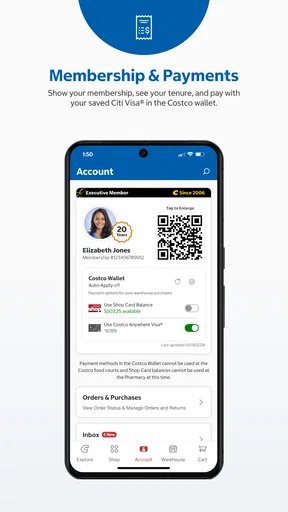
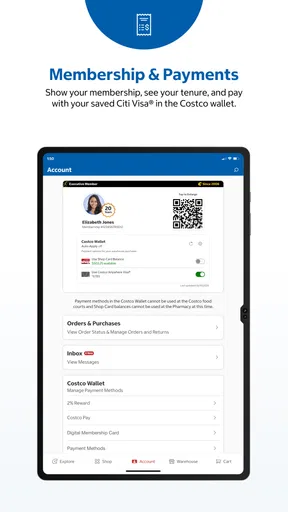
One of my favorite features is how it integrates your membership benefits. With the app, you can easily check your membership status, renew it, or even show your digital card at the store. No more fumbling for that plastic card at the checkout line. It's all about convenience, folks!
- View your membership details
- Access exclusive member-only deals
- Receive notifications for special offers
Deals, Deals, and More Deals
Let's talk savings. The app is fantastic for hunting down those exclusive deals and promotions. You can browse through the latest offers and even set reminders for when a deal is about to expire. It's like having a personal shopping assistant that whispers, "Hey, don't miss this deal!"
"Costco's app helps you snag the best deals without ever leaving your couch."
Easy Checkout Experience
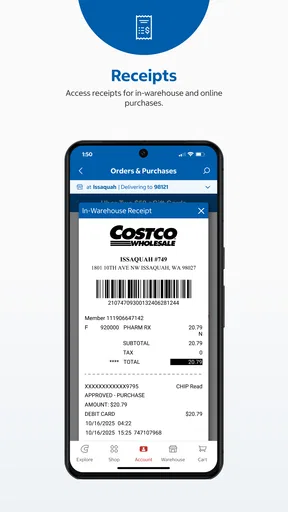
When it comes to checking out, the app keeps things smooth and straightforward. The payment process is secure, and you can save your preferred payment methods for quicker transactions in the future. Plus, tracking your orders is a breeze. You'll know exactly when to expect your bulk goodies to arrive at your doorstep.
For a smoother trip, I’d check the digital membership card before reaching the checkout rather than waiting until I’m in line to open the app and sign in. It’s a small bit of preparation, but it avoids turning a quick membership check into a last-minute phone task. I’d also keep the physical card available as a backup if I’m unsure whether my phone is charged or ready to use.
Room for Improvement
Of course, no app is perfect. While the Costco Wholesale app is pretty solid, a few tweaks could enhance the experience. For example, adding more detailed product descriptions or user reviews could help you make more informed purchasing decisions. But honestly, these are minor things.
That limitation matters most when I’m considering an unfamiliar product or choosing between similar options. I would use the app to find and review what Costco is offering, then look elsewhere for broader comparisons if product details are central to the decision. The app’s strongest role is handling Costco shopping tasks, not serving as a universal product-research destination.
There is also a difference between an app being free and every purchase being a bargain. The download itself costs nothing, but offers only create value when they match something I would reasonably buy. I would skip the app if I’m not a Costco member, don’t expect to shop there, or prefer to make every purchase through a retailer that specializes in smaller quantities. For an occasional Costco customer, the browser or a warehouse visit may be enough; for a regular member, having account and shopping tools together on a phone is easier to justify.
Overall, I’d recommend it to people who already shop at Costco and want a convenient way to manage membership details, browse promotions, search for items, and follow orders. It is less useful as a standalone way to discover the best deal across all retailers, and I wouldn’t install it expecting every product decision to be settled inside the app. For my own routine, its value comes from making Costco errands easier to plan and membership access less fiddly—not from the free download alone. If that’s the kind of help you want, it’s worth trying; if Costco is only an occasional stop, you can comfortably skip it.
Pros
- User-friendly interface for easy navigation.
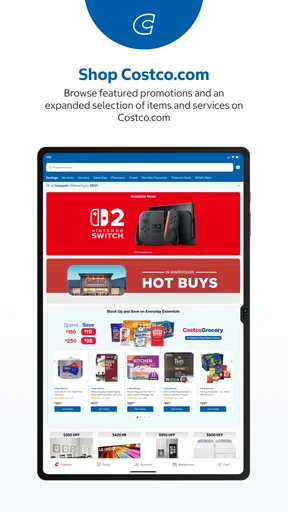
- Wide range of products available online.
- Exclusive member-only discounts and deals.
- Convenient same-day delivery options.
- Efficient order tracking and updates.
Cons
- Membership required to access features.
- Limited customization on notifications.
- Occasional slow loading times.
- Some items not available for delivery.
- App updates can be large in size.
FAQs for Costco Wholesale
What features does the Costco Wholesale app offer?
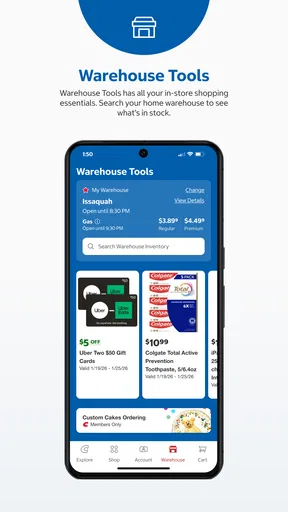
The Costco Wholesale app provides a wide range of features including digital membership cards, easy access to weekly deals, and the ability to shop online. Users can also refill prescriptions, manage photo orders, and track their purchases. Additionally, the app offers a store locator to find the nearest Costco warehouse.
Is the Costco Wholesale app free to use?
Yes, the Costco Wholesale app is free to download and use. However, to access many of its features, such as shopping online and viewing member-only deals, you need an active Costco membership. The app itself does not have any in-app purchases or subscription fees.
How secure is the Costco Wholesale app for online shopping?
The Costco Wholesale app employs robust security measures to protect your personal and financial information. It uses encryption and secure connections for transactions. Additionally, users can enable biometric login options like fingerprint or face recognition for added security when accessing the app.
Can I use the Costco Wholesale app to manage my membership?
Yes, the app allows you to manage your Costco membership easily. You can view your membership details and even renew your membership directly through the app. It also features a digital membership card, which you can use at checkouts instead of the physical card.
Does the Costco Wholesale app offer customer support?
The app provides access to customer support through various channels. Users can find contact information for customer service directly within the app. Additionally, the app offers a comprehensive FAQ section and links to support resources for quick assistance with common issues.


